This post is about code. But it’s also about career change, an idea that stayed on the shelf for a year, and learning to build things I actually want to use.

Personal Context
I’ve been working with front-end for a few years. React, TypeScript, components, design systems, it’s territory I know well and still enjoy. But over time, I started feeling that this isolated space was becoming narrow, both in terms of market and motivation. Front-end alone no longer pays off as it used to, and I started facing this reality head-on.
I am currently in the process of transitioning to a broader profile, one that combines what I already know with what’s happening in the market now: AI, agents, model orchestration, and Python backends. The best way I found to learn was to build. Not a tutorial, but a real product.
And that’s how this project came back to life.
The Original Idea and Why It Didn’t Work
About a year ago, I created an embryonic version of this. The goal was the same: to help people read the entire Bible in a year. But the implementation was completely different.
I created Markdown files, one for each day. Each file had that day’s devotional, the reading text, and a “mark as completed” button. Additionally, I generated audio for those who didn’t want to read, text-to-speech for each devotional.
The problem was scale. Maintaining 365 curated Markdown files, each with original reflective text, plus generating the corresponding audios, wasn’t sustainable for one person. The project stopped in month 2 and stayed shelved for a year.
What changed now was the approach. Instead of me creating the content, the AI accompanies the user. Instead of static devotionals, an agent answers questions about what the user is reading, connects passages, and explains historical context. The content is generated dynamically through conversation.
What was built in a weekend
The project has three main layers:
Backend in FastAPI with Python, using a LangChain ReAct agent orchestrating three custom tools. Frontend in React + TypeScript with a client-side hexagonal architecture. Infra with Docker Compose: backend, frontend, and ChromaDB as the vector store.
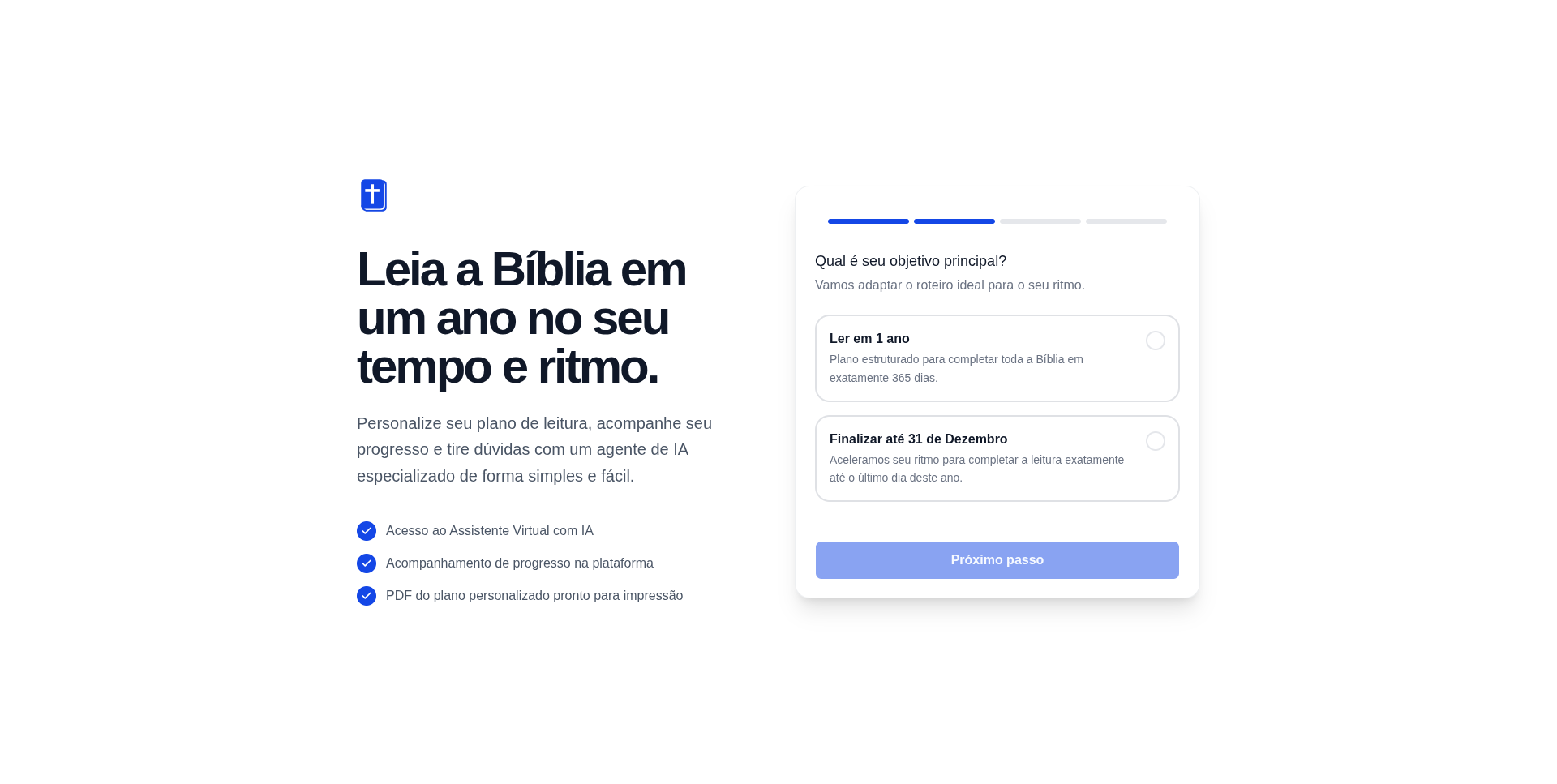
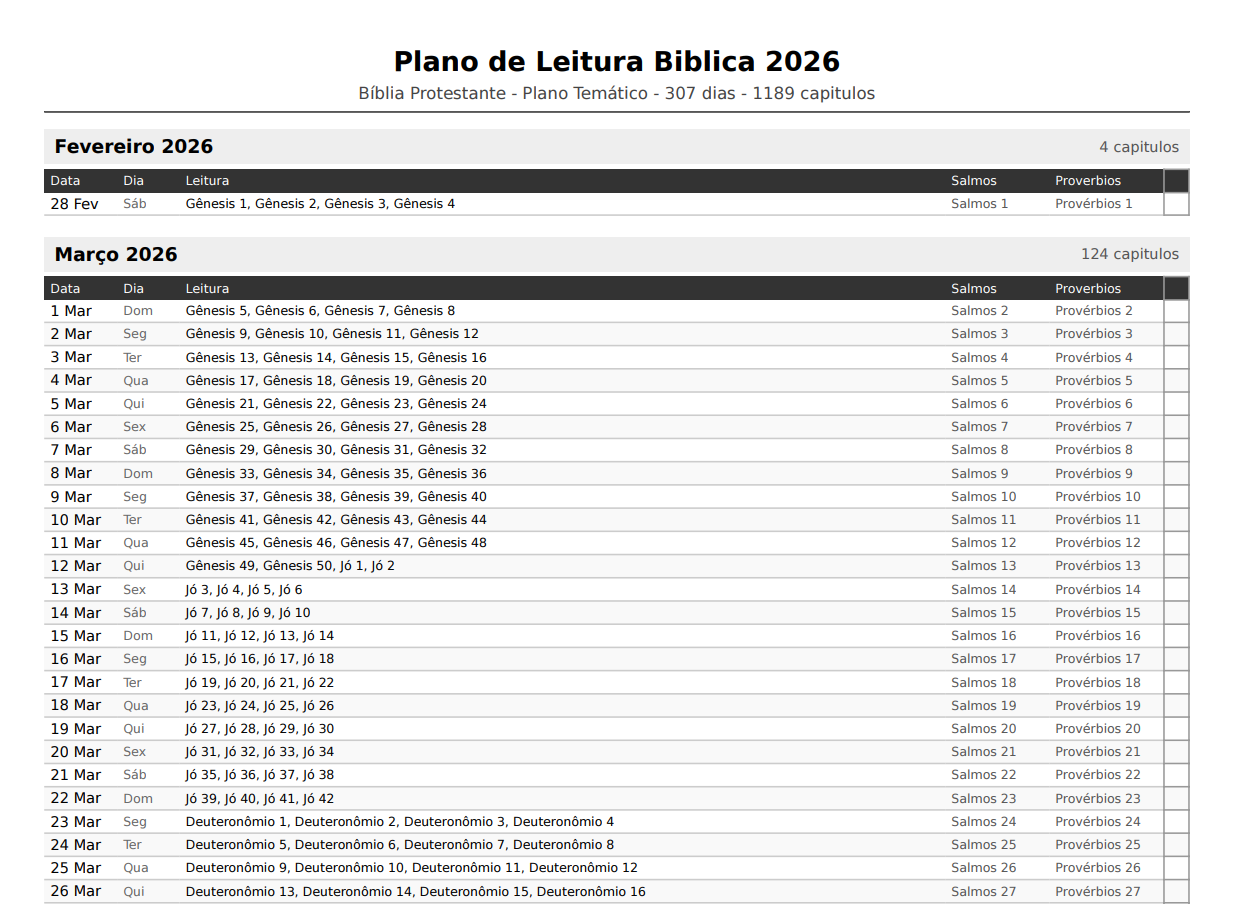
The product differentiator, besides the agent, is the printed planner. Users generate a print-ready A4 PDF that they can use physically to track their reading, checking off days with a pen. This was a deliberate product decision: people trying to build a reading habit often benefit from a physical object.
The business model is a micro-SaaS with a one-time Stripe payment: the user pays once and receives the PDF. The AI agent becomes available as additional value after payment. No subscription, no friction.
Technical Decisions and Lessons Learned
1. LangChain as the Orchestrator (Without “Fetishizing” the Library)
The choice of LangChain was deliberate as a portfolio exercise. I wanted to understand the agent ecosystem. But the implementation was simpler than the framework suggests. Instead of using AgentExecutor for chat conversations (which adds latency and parsing complexity), I opted for a more direct pipeline for the main endpoint: RAG + LLM with streaming via SSE.
The full ReAct agent remained available as an internal tool for plan and PDF generation, where the reasoning chain makes sense. For user interaction, simplicity was better:
async def assistant_chat_stream(
  session_id: str, conv_id: str, message: str
) -> AsyncGenerator[str, None]:

  # User's plan context in the system prompt
  plan = get_plan(session_id)
  onboarding = get_onboarding(session_id)
  system_prompt = build_system_prompt(plan, onboarding)

  # RAG: retrieves relevant context from the biblical database
  rag_context = retrieve_context(message)

  # Direct pipeline: no ReAct overhead for chat
  llm = _get_llm(streaming=True)
  async for chunk in llm.astream([
      SystemMessage(content=f"{system_prompt}\n\nContext: {rag_context}"),
      HumanMessage(content=message)
  ]):
      if chunk.content:
          escaped = chunk.content.replace("\n", "\\n")
          yield f"data: {escaped}\n\n"
The lesson here: ReAct agents are powerful for tasks requiring multi-step reasoning and tool usage. For conversational chat with already available context, a simpler pipeline is faster and more predictable.
2. The System Prompt as the Product
The hardest part wasn’t the code, it was the assistant’s system prompt. A biblical assistant has specific challenges: it needs to be welcoming without being dogmatic, respect different traditions (Catholic, Evangelical, historical Protestant, Orthodox), and remain focused so it doesn’t become a generic chatbot.
The system loads the user’s reading plan directly into the prompt, with a ±15-day window around the current date:
def build_system_prompt(plan=None, onboarding=None) -> str:
  today = date.today().strftime("%d/%m/%Y")

  # Context window: 5 days back + 15 days forward
  current_idx = 0
  for i, d in enumerate(plan.days):
      d_date = d.date if isinstance(d.date, date) else date.fromisoformat(str(d.date))
      if d_date >= today:
          current_idx = i
          break

  start_idx = max(0, current_idx - 5)
  end_idx = min(len(plan.days), current_idx + 15)
  window_days = plan.days[start_idx:end_idx]

  plan_readings = "\n".join([
      f"Day {start_idx + i + 1} ({d.date}): "
      f"Main: {', '.join(d.main_reading)} | "
      f"Additional: {d.proverb}, {d.psalm}"
      for i, d in enumerate(window_days)
  ])
This allows the assistant to know exactly what the user should be reading today, contextualize responses about recent texts, and anticipate questions about upcoming ones. The agent doesn’t need to “guess” the context; it receives it structured.
3. The Plan Generator (The Heart of the Business Logic)
Distributing 1,189 chapters (Protestant version) or 1,370 (Catholic version) proportionally across available days has more nuances than it seems.
Users can choose: read in exactly 1 year (365 days from today) or finish by December 31st of the current year. They can also select which days of the week they’ll read. Based on this, the system calculates chapters per day dynamically:
def generate_plan(data: OnboardingData, session_id: str) -> ReadingPlan:
  start = data.start_date
  end = _compute_end_date(data.goal, start)

  # Filter only selected weekdays
  reading_dates = _get_reading_dates(start, end, data.reading_days)

  main_books = get_main_books(data.bible_version)
  all_chapters = _expand_chapters(main_books)

  total_main_chapters = len(all_chapters)
  total_days = len(reading_dates)

  # Ceiling ensures all chapters are covered even if the last days have fewer
  chapters_per_day = math.ceil(total_main_chapters / total_days)

  plan_days = []
  chapter_idx = 0

  for day_num, reading_date in enumerate(reading_dates):
      day_chapters = all_chapters[chapter_idx : chapter_idx + chapters_per_day]
      chapter_idx = min(chapter_idx + chapters_per_day, total_main_chapters)

      # Psalms and Proverbs are distributed separately, cyclically throughout the year
      plan_days.append(PlanDay(
          date=reading_date,
          main_reading=[ref for ref, _, _ in day_chapters],
          proverb=get_proverb(day_num),   # Pv 1 to 31, cycling
          psalm=get_psalm(day_num),        # Ps 1 to 150, cycling
          ...
      ))
Psalms and Proverbs are treated separately because they play a different role: they are short, complementary readings. The 150 psalms and 31 proverbs are distributed cyclically, you read Ps 1 on day 1, Ps 2 on day 2, and when you reach Ps 150, it restarts. This ensures every daily reading has an anchor of wisdom and a psalm, regardless of where you are in the main plan.
4. Hexagonal Architecture in the Front-end (An Unconventional Choice)
This was the most experimental decision. The frontend follows Ports and Adapters: the business logic lives in core/usecases/, completely decoupled from the React framework. Components are “thin”, they consume the store and call the controller.
// Contract-only, no implementation
export interface IAssistantRepository {
auth(email: string): Promise<AssistantAuthResponse>;
getConversations(token: string): Promise<ConversationSummary[]>;
createConversation(token: string): Promise<ConversationDetail>;
getChatStreamUrl(token: string, convId: string, message: string): string;
// ...
}// Business logic without React
export class AssistantUseCase {
constructor(
private repository: IAssistantRepository, // injected
private storage: IStorageRepository,
private store: typeof assistantStore,
) {}
async handleSend(customMsg?: string) {
const state = this.store.getState();
const text = (customMsg ?? state.input).trim();
if (!text || state.streaming || !state.token) return;
// All streaming and state logic lives here; the React component doesn't know how SSE works
const url = this.repository.getChatStreamUrl(state.token, convId, text);
const eventSource = new EventSource(url);
// ...
}
}The practical benefit: unit tests for business logic don’t need to mount React components. The AssistantUseCase is tested with simple mocks of the interfaces. Swapping one API for another or localStorage for sessionStorage doesn’t touch any component.
It’s a heavier architecture for a small project, but as a portfolio piece, it demonstrates thinking beyond the component.
5. RAG with Fallback (Graceful Degradation as a Principle)
The BibleRAGTool uses ChromaDB with OpenAI embeddings to search the biblical knowledge base. Setting up ChromaDB locally can be a point of friction. The solution was a simple keyword-overlap fallback:
def retrieve_context(query: str, top_k: int = 3) -> str:
  """Retrieve relevant Bible context. Falls back to keyword search gracefully."""

  # Try ChromaDB + embeddings first
  client = _get_chroma_client()
  if client and settings.openai_api_key:
      try:
          collection = client.get_collection("bible_context")
          results = collection.query(query_texts=[query], n_results=top_k)
          if results["documents"][0]:
              return "\n".join(results["documents"][0])
      except Exception as e:
          logger.warning(f"ChromaDB query failed, falling back: {e}")

  # Fallback: keyword overlap search
  return "\n".join(_keyword_search(query, top_k))
This means the project runs locally even without an embedding API key configured. The assistant works with lower quality, but it works. In development, this is invaluable.
What Was Deliberately Left Out
This was a weekend project, so some decisions were pragmatic.
The PDF template ended up simpler than planned. The initial vision was a cover with a dark blue background, Playfair Display typography, and SVG ornaments. What was delivered works, distributes chapters correctly, and fits A4, but uses system fonts instead of editorial ones. This is the most important next iteration.
Test coverage on the frontend remained low. Backend tests cover the main scenarios. Hexagonal architecture was designed precisely to facilitate testing, but there wasn’t enough time to implement them on the frontend.
The devotional section, the original idea that started it all, was left out for now. In the future, the plan is to integrate a dynamically generated devotional for each day’s reading. No more 365 manual files, but a text generated at the moment of reading, contextualized by what the user is reading.
What This Project Means to Me
It’s three things at once:
A tool I will use myself. I want to build the habit of reading the Bible this year. I built the planner thinking of myself as the user. This changes the quality of product decisions; you don’t cut corners when you know you’ll use the result.
A concrete portfolio piece. It’s not a to-do list. It’s a product with real payments, an AI agent, PDF generation, and non-trivial business logic. For someone in career transition, moving from a specialist front-end profile to something more complete, having a project like this to show is worth more than any certificate.
A micro-SaaS experiment. The market this product serves is enormous. Millions of people in evangelical and catholic communities use Bible reading plans. If the product gains traction, there’s room to grow: multiple languages, themed plans, reading groups, and note-taking integration. For now, it’s an idea with code. But it’s an idea that already works.
Final Reflection
The biggest lesson of the weekend wasn’t technical. It was about the difference between a project you finish and one you abandon.
The previous version, the 365 Markdown files, was abandoned because I was the bottleneck. Every new piece of content depended on me. The current version only needs me to maintain the code: the content emerges from the conversation between the user and the agent.
It’s the same lesson the job market is teaching technology workers: what you build needs to be smarter than what you can sustain manually. Automate the mechanical. Focus on the strategic.
I’m learning this in code and applying it to my career.
The project is on GitHub. If you work with AI, platforms for religious communities, or simply want to talk about micro-SaaS, feel free to reach out on LinkedIn.